
Link Settings
Xdun Protect link protection settings tutorial covering all protection feature configurations.
Last updated: 7/25/2026Settings Overview
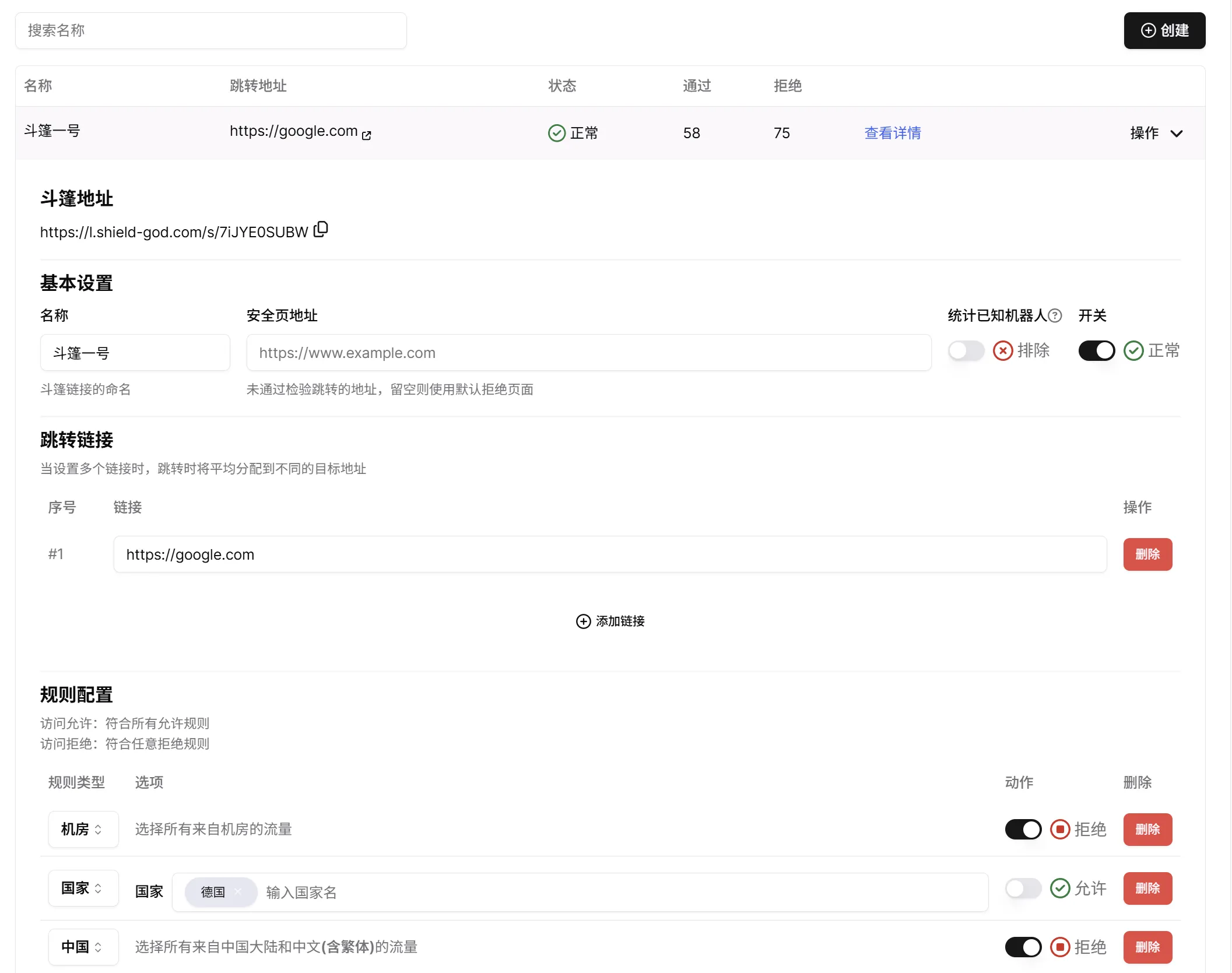
Protected links offer a variety of personalized configuration options to help you handle flexible and ever-changing usage environments.
| Setting | Description |
|---|---|
| Protected Link | The link address that can be published on the internet |
| Basic Settings | Visitors who fail the check will be redirected to a safe page; if none is set, they will be redirected to our default safe page |
| Redirect URL | If multiple redirect URLs are set, traffic will be distributed evenly across them |
| Rule Configuration | Configure which users will be allowed through and which will be denied |
Protected Link
You should not expose your redirect URL, otherwise Xdun Protect's protection will be lost.
The protected link is the protection address we generate for you. Once generated, it cannot be modified or changed. Users accessing via this address will be checked — those who are denied will be redirected to the safe page.
Basic Settings
- Name: The name you assign to your protected link.
- Safe Page URL: The address visitors will be redirected to when access is denied.
- Count Known Bots: Known bots will not leak or use your link. To reduce their impact on statistics, we do not count known bots by default.
Redirect URL
This is the address that visitors are redirected to after passing the system check. If you set multiple redirect URLs, we will distribute traffic evenly across them. The same user will always be directed to the same URL.
The redirect domain is specified when creating the link and cannot be changed after creation. We provide some public domains for quick use. When you need a more independent domain, you can set up a custom domain.
Rule Configuration
We create generic rules for you by default. You can adjust them as needed.
This setting configures the detailed allow and deny rules. For specific rule descriptions, see Rule Configuration.
When only deny rules are configured, any visitor matching any deny rule will be denied; all others will access normally.
When only allow rules are configured, only visitors matching all allow rules will be permitted; all others will be denied.
When both deny and allow rules are configured, a visitor will only be allowed if they do not match any deny rule and match all allow rules.